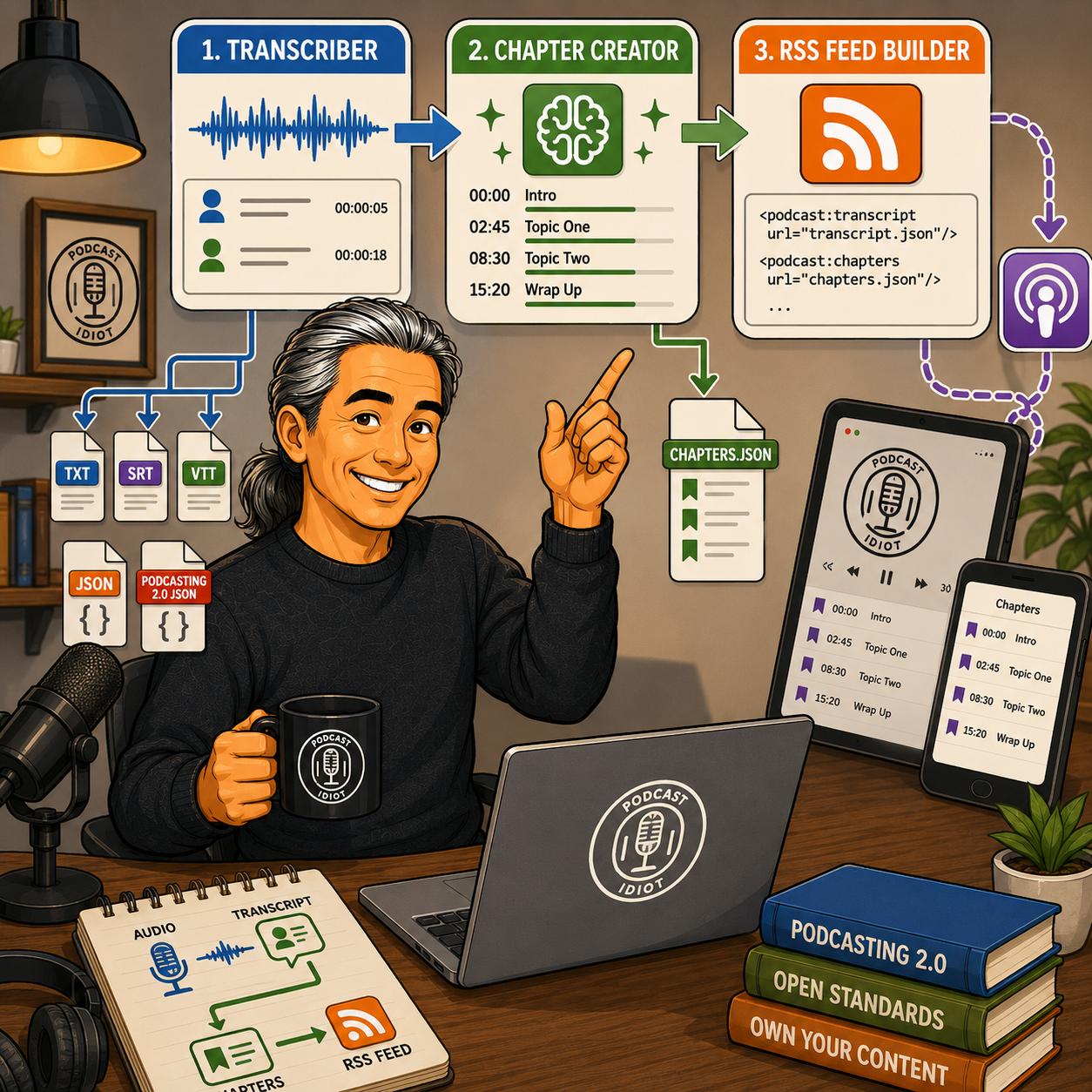
First a Podcast RSS Feed Creator/Editor, then a podcast player app, so why not complete the podcast toolset loop and create a transcriber and a chapter creator! Done! You know you were asking for it. Well, at least I was. And, now with how good AI has gotten with turning my ramblings into working products I’m making little crappy pieces of software left and right!
My workflow is now complete
The process now runs from a finished audio recording all the way to a Podcasting 2.0-ready RSS feed. First, I record an episode. That audio file goes into the Podcast Idiot Transcriber. The transcript produced by that application goes into the Podcast Idiot Chapter Creator. The transcript and chapter file are then referenced in the RSS feed using my Podcast Idiot RSS Feed Builder. Every tool was designed specifically for the next one in the chain.
Podcast Idiot Transcriber
The first application I built was the Transcriber. Unlike the RSS Feed Builder, which runs in a browser, the Transcriber is a desktop application available for Windows, macOS, and Linux. It uses OpenAI’s Whisper speech recognition engine, but everything runs locally on your computer. Your audio never leaves your machine and there are no API charges or monthly subscription fees.
The first time you launch the application, it downloads the Whisper model you choose and installs everything it needs. After that, transcription works completely offline.
One feature I particularly wanted was flexibility. Whisper offers several model sizes ranging from tiny to large. Smaller models are much faster, while larger models improve accuracy, particularly with noisy recordings or unusual terminology. Most people will probably find the default Base model to be the best balance, but the choice is there depending on your hardware and your priorities.
The application even detects supported GPUs automatically. If you’re running an NVIDIA card, Apple Silicon, or compatible AMD hardware, Whisper takes advantage of it to reduce transcription time.
Another feature I wanted was support for multiple speakers. Instead of producing one continuous wall of text, the application can identify different speakers and label them throughout the transcript. That capability requires a free Hugging Face account because it uses the pyannote.audio library, but the setup only takes a couple of minutes (supposedly because I haven’t tested this out yet). If you don’t care about speaker labels, you can simply leave the feature disabled and generate a standard transcript.
The output options cover just about everything I could think of needing. The application produces plain text transcripts, SRT and VTT caption files, detailed JSON containing timestamp information, and Podcasting 2.0 transcript JSON that can be referenced directly from an RSS feed.
Podcast Idiot Chapter Creator
Once I had transcription working, I moved on to chapters! Podcasting 2.0 chapters are one of my favorite improvements to podcasting because they let listeners jump directly to the sections that interest them. Compatible podcast players, including the Podcast Idiot Podcast Player PWA I created, display chapter markers automatically, making longer episodes much easier to navigate.
Creating them has always been a pain. Adding chapter markers means listening through an episode while constantly stopping playback, noting timestamps, and deciding where conversations naturally change direction. It’s tedious work that usually gets postponed until later, or just skipped.
The Chapter Creator eliminates most of that effort. You simply load the transcript generated by the Transcriber, or any transcript in TXT, VTT, or JSON format, and the application asks an AI model to identify the major topic shifts. Within a few seconds, it produces a Podcasting 2.0 chapters file that is ready for editing.
The application works with Claude, ChatGPT, and Gemini. If you already have an API key, you paste it into the program and it communicates directly with the provider. The application doesn’t store your key.
I also wanted people without API access to be able to use it because I’m one of those people. So I built a second workflow. Further down the form is a section labeled “Use a free AI chat instead”. The form generates a complete prompt tailored to your episode title, podcast name, and desired number of chapters. You simply copy the prompt into a free Claude, ChatGPT, or Gemini conversation along with your transcript, and the AI returns a fully formatted JSON file you can upload.
Regardless of which approach you use, the generated chapters appear in an editable list where you can tweak timestamps or rename chapter titles before downloading the finished chapters.json file.
Using AI to build stupid software
I hope using AI for these types of projects only gets better. There is nothing like having an idea in your head and being able to make it come to fruition. I described what I wanted, tested every build, reported bugs, suggested improvements, and kept iterating until the applications worked the way I envisioned.
For someone like me who knows a little about writing code but hates doing it and is quite frankly terrible at it, AI is the software engineer buddy you always wanted but never could afford. I would never pay anyone to create this stuff. I would always find something someone else built and live with it. Now, stupid little niche programs that are worth something only to me are within reach.
I like working independently, I don’t like paying for subscriptions. I don’t mind paying for software if it is exactly what I need. But these tools are so specific that only a small number of people would ever want them. Who would spend the time and money to create stuff for a few people?
With the RSS Feed Builder, the Transcriber, and the Chapter Creator now finished, my entire publishing pipeline is under my own control (cue the evil laugh). I record the episode. Generate the transcript. Create the chapters. Build the RSS feed. Publish. My podcasting empire is going to be (insert whatever the kids these days like to say)!